

Print Your Own Property Tax Bill
Important: Make sure your web browser allows pop-ups. If pop-ups are blocked, the tax bill will not open.
This printed copy is unofficial and provided for reference only. It cannot be used to make payments at bank branches and is not a substitute for an official tax bill issued by the Lucas County Treasurer’s Office.
Step 1. Click on AREIS Property Search:
Step 2. Search for your property. Once your property record opens, look on the right-hand side of the page.
Step 3: Select “Tax Bill” from the “Reports” box on the right side, and click “Go” to open your current tax bill.
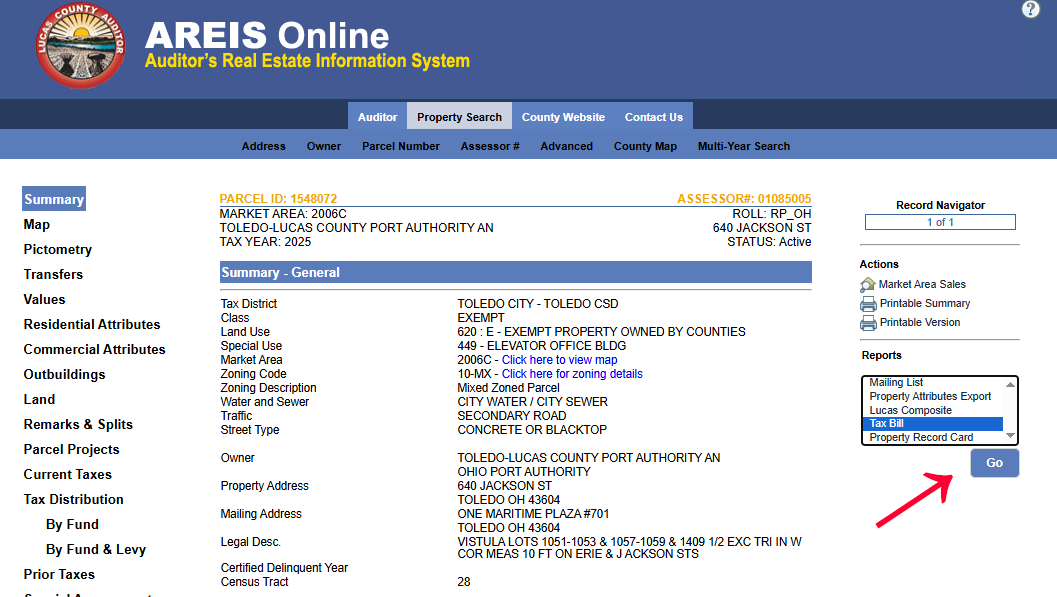
Your current tax bill will open in a new window and can be printed or saved as a PDF.
Important: Make sure your web browser allows pop-ups. If pop-ups are blocked, the tax bill will not open. This printed copy is unofficial and provided for reference only. It cannot be used to make payments at bank branches and is not a substitute for an official tax bill issued by the Lucas County Treasurer’s Office.